Stormkey for Gmail

Protect Gmail attachments before they sit in the inbox.

Stormkey helps you encrypt files before sending them. For Gmail, the Chrome Extension brings protection closer to the email workflow your team already uses.

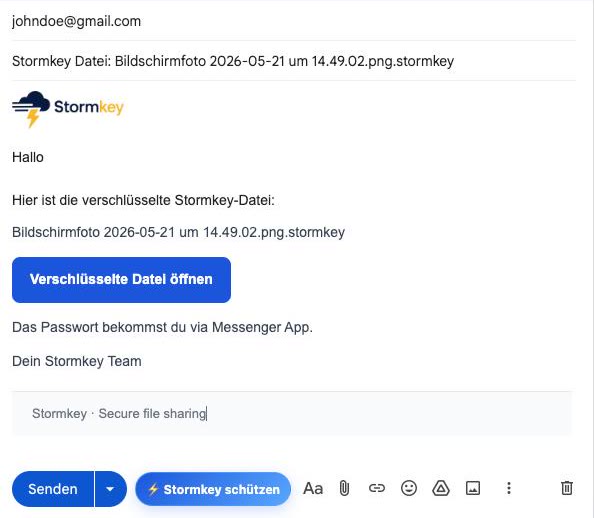
Stormkey Chrome Extension in Gmail
Inside the workflow

The extension is built for Gmail and brings protection closer to the moment of sending.

Encrypt locally

The file is protected before it is shared instead of being sent as a plain attachment.

Separate the password

The main gain remains simple: do not share the password in the same email thread.

Why Gmail attachments need extra protection

Gmail is strong for communication, but confidential attachments can remain in inboxes, backups, and forwarded threads for years. If an account is compromised, old attachments become attractive targets.

Stormkey adds protection before delivery: protect, send the file link, and share the password link separately. This makes access more deliberate and reduces risk when emails are forwarded or archived.

Good rule: Gmail transports the protected file link. Access comes through a separate channel.

Can I use Stormkey without the extension?

Yes. The web demo and web app work directly in the browser. The extension is more convenient for Gmail.

Should the password go into the same Gmail thread?

No. Share it separately, for example by messenger, phone, or a second channel.